STEP Files
How to Open a STEP File Without SolidWorks
Received a .step or .stp file but don’t have SolidWorks? You can view it for free with an online viewer, a desktop viewer or free CAD software. Here is how to choose.
On this page
Quick answer
You don’t need SolidWorks to open a STEP file. STEP is a neutral format (ISO 10303), so it can be opened by:
- an online STEP viewer — fastest if you only need to look at it;
- a free desktop program such as FreeCAD — if you also need to edit or export;
- most other CAD programs you may already have (Inventor, CATIA, NX, Creo, Solid Edge…).
Which option is best depends on what you need to do with the model: just look at it, measure it, modify it or pass it on to someone else. Below are the options, from the lightest to the most complete.
Your options at a glance
| Option | Install | Can edit? | Best for |
|---|---|---|---|
| Online STEP viewer | No | No | Looking at a model quickly, on any computer |
| Desktop viewer | Yes | No | Frequent viewing, working offline |
| Free CAD (e.g. FreeCAD) | Yes | Yes | Measuring in depth, modifying, exporting |
| Convert to another format | Depends | No | 3D printing, web or presentation use |
| Share as 3D PDF | Reader only | No | Sending the model to people without CAD |
Option 1: use an online STEP viewer
A browser-based viewer is the quickest way to see what is inside a STEP file. You drag the file onto the page and the model appears in 3D; there is nothing to install and it works the same on Windows, macOS, Linux or a Chromebook.
Before using one with confidential designs, check where the file is processed. Many online viewers upload the file to their servers to convert it. Others, like the StepPDF 3D viewer, read the file inside your browser with WebAssembly, so the model is not uploaded to a server. Autodesk also offers a free online viewer (Autodesk Viewer) that supports STEP among many other formats; files are uploaded to Autodesk’s cloud.
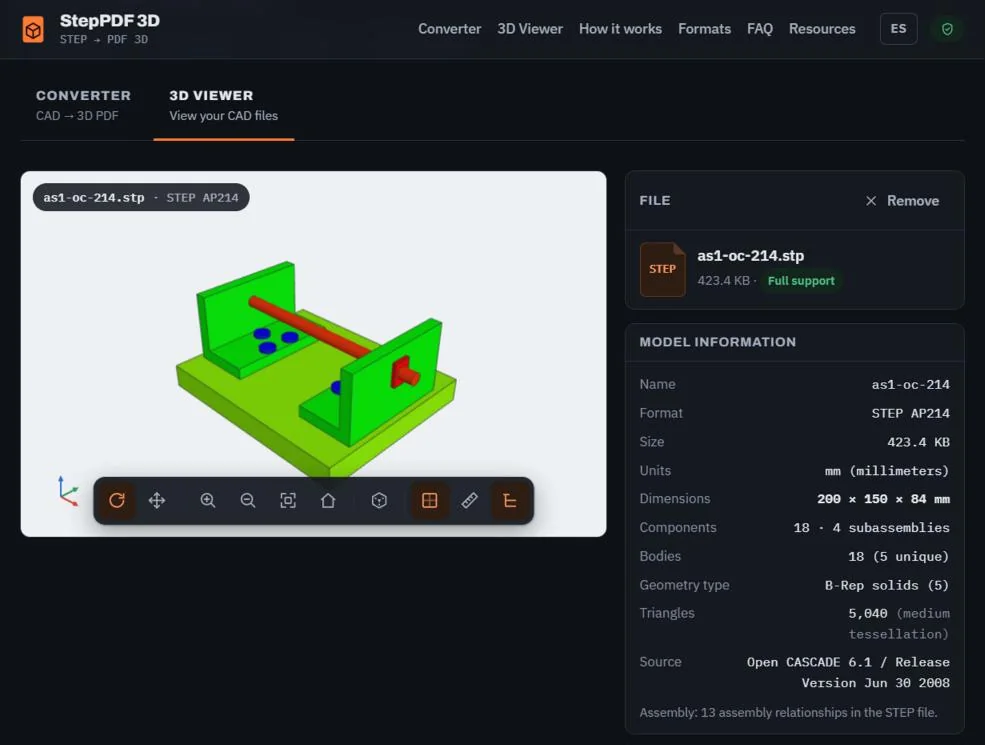
How to open a STEP file in the browser, step by step
- Open the 3D Viewer.
- Drag your
.stepor.stpfile onto the upload area, or click Select file. - Wait while the CAD engine reads the geometry. The first time, the engine itself is downloaded: the OpenCascade WebAssembly file is about 7.6 MB uncompressed, and the browser caches it for later visits.
- Rotate by dragging, zoom with the mouse wheel or a pinch, and pan with the right button or two fingers.
- Use the standard views, the part tree to hide or isolate components, and the measuring tool to check a distance between two points.
The side panel also shows what the file contains: the STEP protocol (AP203, AP214 or AP242), units, overall dimensions, number of components and bodies. According to the OpenCascade STEP translator documentation, the kernel used by the viewer reads AP214 and AP203, and only part of AP242. That is often enough to answer the question “is this the right part?” without opening any CAD program.
What to expect: a test with a real assembly
We measured the viewer with the sample assembly as1-oc-214.stp (STEP AP214, 433,606 bytes, 9 products and 18 parts on screen). The test ran in an automated Chromium browser on a server with a 2.8 GHz Xeon processor, about 8 GB of RAM and software rendering, repeating each measurement three times:
- File read and 3D view ready: median of 3.37 s at medium tessellation quality.
- What it recognises: millimetre units, 200 × 150 × 84 mm, 18 components in 4 subassemblies, 5 distinct B-Rep solids and 5,040 triangles for display.
These are timings for that specific machine: on a computer with a graphics card they will differ, and an assembly with hundreds of parts will take considerably longer. What matters is the order of magnitude: a STEP file of this size can be checked in seconds, with nothing to install.
The viewer also has fixed limits so it does not freeze the browser:
| Limit | Value | What happens |
|---|---|---|
| File size | 100 MB | Larger files are rejected with a message showing their size |
| Processing time | 3 minutes | Processing is cancelled and the “Low” quality is suggested |
| Triangles on screen | 6 million | The viewer does not display the model and suggests a lower quality |
| Files at once | 1 | One file is processed at a time |
Option 2: install a desktop viewer
If you open STEP files every week, a desktop viewer can be more comfortable: it works offline, remembers your settings and usually handles very large assemblies better than a browser tab. The OpenCascade team, for example, publishes a free viewer called CAD Assistant. Check the platforms and license of any viewer before installing it on a work computer — policies change and some tools are free only for personal use.
Option 3: use free CAD software
FreeCAD is a free, open-source parametric CAD program for Windows, macOS and Linux that imports and exports STEP. It goes far beyond viewing: you can take measurements, section the model, modify the solid and export it to other formats.
The trade-off is complexity. FreeCAD is a full engineering tool with a learning curve, so it is overkill if all you want is a look at a supplier’s part. Some commercial CAD vendors also offer free or trial editions with restrictions (for example, for non-commercial use or with public documents); read the terms before using them for professional work.
Whatever CAD you use, remember that a STEP file has no feature history. You will get a solid you can modify, not the original sketches and operations.
Option 4: convert the model to another format
Sometimes you don’t need STEP at all, but a format that another tool understands:
- STL or 3MF for 3D printing slicers.
- OBJ or GLB for rendering, game engines, web pages or presentation software.
These are mesh formats: the exact curves become triangles and assembly information is reduced or lost, so convert a copy and keep the original STEP. After loading a STEP file, the StepPDF 3D converter offers STL, OBJ and GLB downloads besides the 3D PDF.
Option 5: the model is for someone else? Send a 3D PDF
A common situation: you can open the STEP, but your customer, your manager or the purchasing department can’t. Asking them to install a viewer is friction. A 3D PDF embeds the model in a PDF document that they can rotate, zoom and explore in Adobe Acrobat Reader, which many offices already have.
The pros and cons of each way of sending a model — screenshots, STEP, viewer links, 3D PDF — are compared in how to share a 3D CAD model without CAD software.
If the STEP file won’t open
There are four common causes: the file is not really STEP (it does not start with ISO-10303-21;), it is incomplete (it does not end with END-ISO-10303-21;), it is a native format such as .sldprt that has to be exported first, or it is too large for the computer's memory. Assemblies with missing parts are usually caused by external references, and models that show up as loose surfaces by an export without solids.
We tested each case with deliberately prepared files and documented the exact messages and the fix for each one in my STEP file won't open or convert: causes and fixes.
Frequently asked questions
Can I open a STEP file for free?
Yes. Online STEP viewers, free desktop viewers and free CAD software such as FreeCAD can open STEP files at no cost. You only need paid CAD software if you have to modify the design professionally.
Can I open a STEP file on my phone?
Yes, with a browser-based viewer that supports mobile devices. Rotating with one finger and zooming with a pinch work fine; very large assemblies can be slow on phones with little memory.
I received a .SLDPRT or .SLDASM file, not a STEP. What now?
Those are native SolidWorks files, and most other programs can’t read them. Ask the sender to export a STEP file (File › Save As › STEP). If you only need to look at it, Dassault Systèmes offers a free viewer called eDrawings Viewer that opens SolidWorks files.
Why does my STEP file look faceted or rough?
Viewers display STEP geometry as triangles. The underlying geometry is exact, but the on-screen approximation depends on the tessellation quality. Choosing a higher quality gives smoother curves at the cost of speed.
Can I edit a STEP file without SolidWorks?
Yes, in another CAD program — FreeCAD is a free option. Keep in mind that STEP carries no feature history, so you edit the solid directly or remodel features. Viewers, including the one on this site, can’t edit geometry.